Guide
When to replace robot vacuum brushes, filters and mops
Published
Note: This page contains affiliate links. If you buy through them we may earn a commission at no extra cost to you. Learn more
In short
Makers commonly suggest replacing side brushes and filters every few months, main brushes roughly every 6 to 12 months and disposable mop pads more often, but intervals vary by maker and by how much the robot runs. The most reliable guide is the consumables counter in your robot's app, backed up by the manual and by what the part actually looks like.
Products for this job
Compare all 7 productsRoomba Combo 10 Max: rubber brushes, avoids pet bowls
Check price on AmazonAffiliate linkEcovacs T90 Pro Omni: 30,000 Pa with ZeroTangle 4.0
Check price on AmazonAffiliate linkShark PowerDetect NeverTouch Pro: 60-day bin, NeverStuck
Check price on AmazonAffiliate link
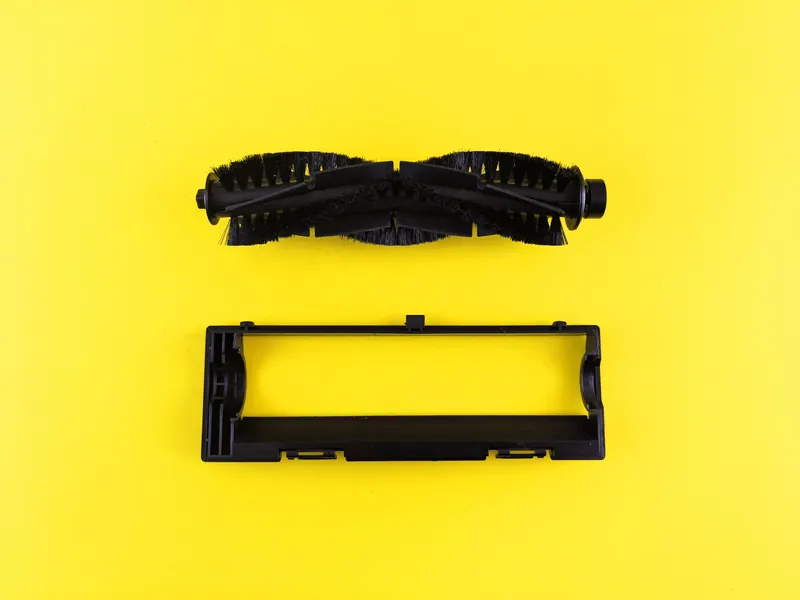
Robot vacuums keep cleaning well only while their brushes, filters and mops are in decent shape. A splayed side brush flicks dust away from corners, a clogged filter cuts airflow and a worn mop pad smears rather than lifts. This schedule sets out the typical replacement ranges makers commonly suggest for each part, the signs a part is worn, and how to buy the right spares for Eufy, Shark, Dreame, Roborock and other robots.
Start with the app's consumables counter
Most current robot apps, including those from Roborock, Dreame, Ecovacs, Eufy, iRobot and Shark, include a maintenance or consumables screen. It counts down the remaining life of each part, usually in hours of use or as a percentage, and sends a reminder when a part is due. When you fit a new part, you reset its counter.
These counters are based on running time, not on the actual state of the part, so treat them as a prompt to look rather than an order to buy. A home with long-haired pets and thick rugs may need parts sooner; a small flat with hard floors may get longer from them. The manual for your model gives the maker's own intervals.
Replacement schedule by part
The ranges below are typical of what makers commonly suggest across popular robots. They are a starting point, not a rule. Always check your own robot's app and manual, which take priority over this table.
| Part | Clean | Replace (typical range) | Signs it is worn |
|---|---|---|---|
| Side brush | Every week or two | Often every 3 to 6 months | Bent, splayed or missing bristles |
| Main brush or roller | Every week, remove hair | Often every 6 to 12 months | Worn bristles or fins, damaged end caps |
| Filter | Tap out every week or two | Often every 2 to 6 months | Grey and clogged even after tapping |
| Disposable mop pad | Not reusable | Often every few uses to a few weeks | Flattened or stained fibres |
| Washable mop pad or roller | After use or by the dock | Often every few months | Matted, smelly or frayed |
| Dock dust bag | Not reusable | When the app or dock says full | Fill line reached |
| Dock filter (some bases) | As the manual says | Per manual | Visible clogging |
| Sensors and lidar window | Wipe regularly | Not usually replaced | Bumping, errors, poor mapping |
Brushes: side brush and main brush
The side brush is the small spinning brush at the front edge that sweeps dirt from skirting boards and corners into the robot's path. It takes a beating from table legs and walls, so it usually needs replacing more often than the main brush. On most robots it clips on or is held by a single small screw, which makes it an easy swap.
The main brush sits under the robot and lifts dirt into the bin. Some makers use bristles and rubber fins, others rubber-only rollers that tangle less with hair. Shark's self-cleaning brushrolls and similar anti-tangle designs reduce wrapping, but hair can still collect at the ends. If you search for an Eufy RoboVac brush replacement or a Shark side brush, match the part number from your manual, because brushes differ across ranges.
With pets, check the main brush ends every week. Hair wound round the axle makes the brush motor work harder and can wear the bearings. Our guide to the best robot vacuum for pet hair covers which brush designs tangle least.
Filters and mop parts
Most robots use a pleated filter in the bin. Tap it against the inside of a bin to remove dust every week or two. Many filters must not be washed, while some are washable, so check the manual before rinsing one. A wet filter refitted too soon can damage the robot and grow mould; washable filters need to dry fully, often for a day.
Mop parts vary widely. Simple robots use a disposable or washable pad on a plate. Robots with rotating mops or roller mops, often on all-in-one docks, wash and dry the mops automatically, but the pads still wear and are sold as spares. Replace them when they are matted, frayed or stay smelly after washing. Use only the cleaning solution your maker allows; see our article on robot mop cleaning solution.
All-in-one docks add their own maintenance: the dirty-water tank, the mop washing tray and sometimes a dock filter all need regular cleaning.
Buying the right spares
Spares are model specific. A Dreame part for one dock may not fit another Dreame robot, and the same goes for Roborock, Ecovacs and Eufy ranges. Before you buy, find your exact model name on the label under the robot or in the app's device settings.
Genuine parts are made to the maker's tolerances. Third-party accessory kits are cheaper and can bundle brushes, filters and pads together, and many fit well. The usual weak points are brushes with softer bristles, filters with looser seals and mop pads that do not grip the plate. If a compatible part does not fit snugly, return it rather than forcing it.
- Check the model name on the robot's label or in the app.
- Match the part to that exact model, not just the brand.
- Prefer kits that list your model in the title and description.
- Keep one spare side brush and filter in the drawer so you are not caught out.
- Reset the app's counter after fitting each new part.
Frequently asked questions
How often should I replace a robot vacuum filter? Makers commonly suggest every few months, often somewhere in the 2 to 6 month range, with tapping out between changes. Your app's counter and manual give the interval for your model.
Can I wash a robot vacuum filter? Only if the manual says it is washable. Many pleated filters should be tapped clean, not washed. If yours is washable, let it dry completely before refitting.
Do I have to use genuine brushes and filters? No, but genuine parts are guaranteed to fit. Compatible parts are fine if they match your exact model and fit snugly; replace them if they wear quickly or leak dust.
What happens if I never replace the side brush? A worn side brush flicks dirt away rather than into the robot's path, so edges and corners are left dusty. It is one of the cheapest and easiest parts to change.
What you need
- Check price on AmazonAffiliate link
iRobot Roomba Combo 10 Max: mop retracts to top of robot
- Check price on AmazonAffiliate link
Dreame L40 Ultra Gen2: 25,000 Pa and an extending mop
- Check price on AmazonAffiliate link
Xiaomi H40: compact 32.6 cm self-empty base
- Check price on AmazonAffiliate link
eufy E28 Omni: 20,000 Pa plus a portable deep cleaner
From: Eufy robot vacuums compared: Omni stations and roller mops