Fix
Robot mop not dispensing water: fixes
Published
Note: This page contains affiliate links. If you buy through them we may earn a commission at no extra cost to you. Learn more
In short
When a robot mop leaves the floor dry, the cause is usually simple: the water flow is set to off or low in the app, the tank is not seated properly, carpet mode has lifted or paused the mop, or a filter or outlet hole is blocked. In hard water areas, limescale build-up in the outlet holes or pump is a common culprit and needs gentle cleaning.
Products for this job
Compare all 7 productsDreame L40 Ultra Gen2: 25,000 Pa and an extending mop
Check price on AmazonAffiliate linkEcovacs T80S Omni: self-washing roller mop, 24,800 Pa
Check price on AmazonAffiliate linkEufy Omni S1 Pro: 10-in-1 station and roller mop
Check price on AmazonAffiliate link
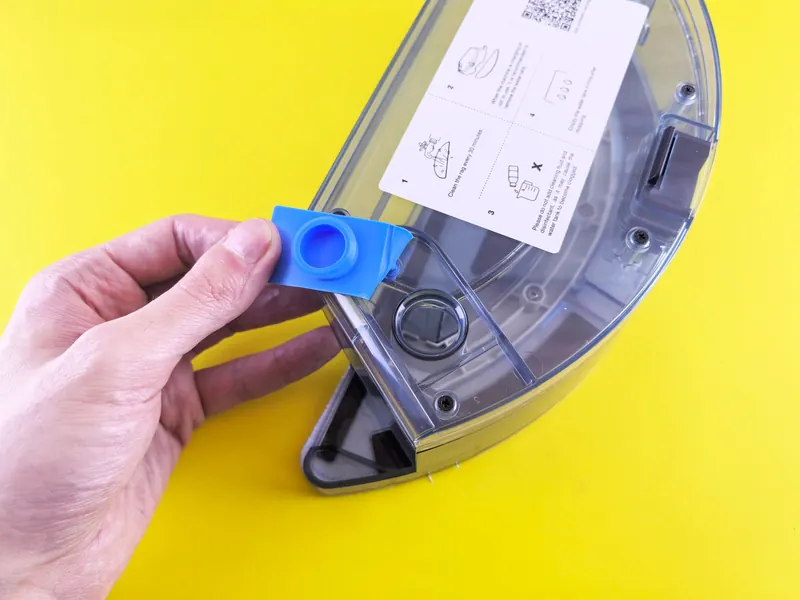
Robot mops wet the pad by letting water trickle or pump from a tank through small outlet holes. Those holes and any filter in front of them are tiny, so it takes very little to stop the flow. Before you assume the pump has failed, work through the checks below in order. Most of them take a minute, and the same pattern applies whether you own an Ecovacs Deebot, a Roborock, a Dreame, an iRobot Braava or Combo, or a Eufy model, although menus and part names vary by maker.
Quick checks: settings, tank and mode
Start with the things that are not faults at all. Many apps let you set water flow per room or per clean, and a room set to off or low will look like a broken mop. A tank that is not pushed fully home may not open its valve or connect to the pump. And on robots with carpet detection, the mop may lift, pause or stop wetting when it is over a rug, which is a feature rather than a fault.
- 1
Open the maker's app and check the water flow or mopping level for the whole home and for each room; set it to medium or high to test.
- 2
Check the clean-water tank has water in it and is not just a few millimetres from empty.
- 3
Remove and refit the tank or mop module until it clicks into place.
- 4
Check the mop pad or mop module is fitted, as some robots will not release water without it.
- 5
Run a test on a hard floor away from rugs, so carpet detection does not lift or pause the mop.
- 6
On docked models, check the dock's clean-water tank is full and seated, as the dock may refill the robot.
Common causes at a glance
The table runs from the most common, easiest fixes to the ones that may need support. If you find the cause early, stop there and test.
| Symptom | Likely cause | What to try |
|---|---|---|
| Pad dry everywhere | Water flow set to off or low in the app | Raise the flow setting and run a short test |
| Pad dry, tank full | Tank or mop module not seated | Remove and refit until it clicks |
| Dry only near rugs | Carpet mode lifting or pausing the mop | Normal behaviour; check carpet settings in the app |
| Damp patch then dry | Filter or outlet holes partly blocked | Rinse the filter and clear the holes |
| Gradually less water over months | Limescale build-up in hard water | Descale gently as the manual allows |
| Pump sound but no water | Airlock or blocked pipe | Refill, reseat and run on high; contact support if it persists |
| No water and an error message | Sensor or pump fault | Check the app message, then contact the maker |
Clear blocked filters and outlet holes
Many tanks have a small filter or sponge where the water leaves the tank, plus a row of pinhole outlets above the mop pad. Fluff, hair and mineral deposits block these over time. A dirty or crusted mop pad can also stop water spreading, so the floor looks dry even when some water is coming through.
Avoid poking hard objects into the outlets, as you can damage seals or enlarge the holes. A soft brush and warm water are usually enough.
- 1
Empty the tank and remove it from the robot or dock.
- 2
Find the filter or sponge at the water outlet and rinse it under warm running water.
- 3
Clean the outlet holes gently with a soft brush or a cotton bud; a fine pin only if the manual allows it.
- 4
Wash the mop pad or rotating mops, as a stiff, dirty pad spreads water badly.
- 5
Let everything dry, refit, fill with fresh water and test on high flow.
Limescale in hard water areas
Much of England, especially the South East, East Anglia and parts of the Midlands, has hard water. Over months, the minerals leave scale in tanks, outlet holes, pumps and dock pipes, slowly reducing flow until the mop barely wets the floor. If your kettle furs up quickly, assume your robot mop is collecting scale too.
Some makers suggest using distilled, filtered or softened water to slow scale, but others say to use tap water only, and some warn against softened water or descalers. Follow your manual. If it allows filtered or distilled water, that can help. Do not add vinegar, bleach, essential oils or third-party cleaning solutions where the maker warns against them, as they can damage seals and pumps and may void the warranty. Some docks have a self-cleaning or descaling routine in the app; use that if it exists. Our article on robot mop cleaning solution covers what is usually safe to add.
Brand notes and when to contact support
The same checks apply across brands, but where they live varies. On many Ecovacs Deebot models, water flow is set per room in the app and the mop plate must be fitted for water to flow. On iRobot Braava jet models the pad type tells the robot how much to spray, so using the wrong pad changes the flow. On Roborock, Dreame and Eufy docks, the dock often washes and re-wets the mops, so a dry mop can point to an empty clean tank or a blocked dock pipe rather than the robot. Check your manual for the exact steps on your model.
If the tank is full and seated, the setting is high, the filter and holes are clean and there is still no water, the pump or a valve may have failed. Contact the maker's support, especially while the robot is in warranty. Looking for a new machine for wood floors? See the best robot mops for hardwood floors, and for a compact pick the best robot vacuums for small flats.
Note:Switch the robot off and take it off the dock before removing tanks or cleaning near the charging contacts. Keep water away from the contacts and electronics, dry any spills before charging, and do not open the robot's casing; leave internal pump or electrical repairs to the maker's service or a qualified repairer.
Frequently asked questions
Why is my Ecovacs Deebot not putting out water? Check the water flow level in the app, make sure the mop plate is fitted and the tank is seated, then clean the tank filter and outlet holes. In hard water areas, scale build-up is a common reason for gradually weaker flow.
Why does my robot mop stop wetting near rugs? Many robots detect carpet and lift, pause or stop the mop to keep rugs dry. Check the carpet settings in the app if you want a different behaviour.
Can I use distilled water in my robot mop? Some makers allow or suggest it to reduce scale, others say tap water only. Follow your manual for your model.
Why is my iRobot mop not working? On Braava jet models, check the pad is the right type and clipped in, the tank is filled and the nozzle is clean. On Roomba Combo models, check the mop pad is attached and, where your model has one, the water or mopping setting in the app.
What you need
- Check price on AmazonAffiliate link
Dreame L40 Ultra Gen2: 25,000 Pa and an extending mop
- Check price on AmazonAffiliate link
Ecovacs T50 Max Pro Omni: 18 mm lift, 45°C drying
- Check price on AmazonAffiliate link
iRobot Roomba 205 DustCompactor: no emptying station needed